

In the DDApp Tally Sheet can be created. It allows to track the pipe strings and casing strings inserted into the hole and to determine actual assembly set depth using the total length of run joints. To add tally sheet click on Create new Tally Sheet button. In the opened form enter the name of the sheet and select the associated section from the Section drop-down list.
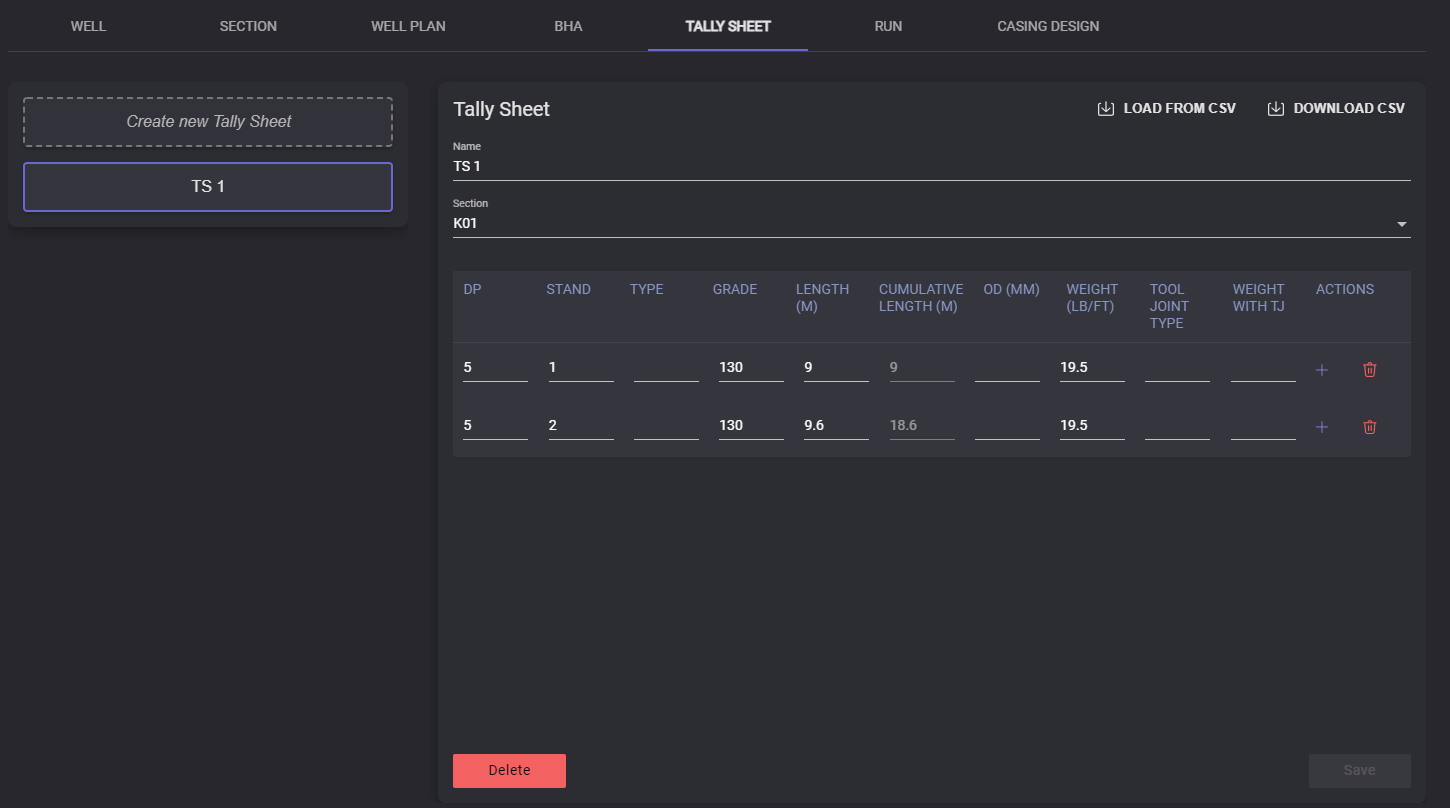
The tally sheet consists of the list of the joints. To add the joint to the table click on the “+“ button at the action column. A new row will be added below the current. Enter joints parameters to the table: DP, Stand, type, grade, length (in meters), cumulative length (in meters), OD (in meters), weight (LB/FT), tool joint type, weight with TJ.
To delete the row click on the Delete button in the Actions column.
After creating and adding all information to the Tally sheet click on the Save button to save the information.
Tally Sheet can be removed by clicking on the Delete button.
Important: Tally sheet deleting could not be undone
The selected Tally sheet can be exported to the .csv file by clicking on the Download CSV button. In the opened modal window specify the local folder to export the file. The .csv file will be saved in the selected folder.
Data can be imported to the Tally sheet. To do so, click on the Load from CSV button, and in the Open file window select the file containing corresponding data and click the Open button. Data from the selected file will be filled into the corresponding columns.